An assistant answers.
An agent executes.
We build agents that take a task through end to end inside your applications — search, check, enter, notify — under explicit permissions, complete logging and human validation for sensitive actions.
The difference, without jargon
An assistant answers
You have to ask it the question, at the right moment, with the right words. It produces an answer: you check it, you carry it into the application, you type in the result. The value is real, but it depends on the user being available and paying attention.
An agent executes
It receives an objective, breaks the task down, calls the tools it is allowed to use, checks what comes back, tries again if needed, then reports what it did. You remain the judge of the outcome, but you are no longer the operator.
Seven areas where agents work
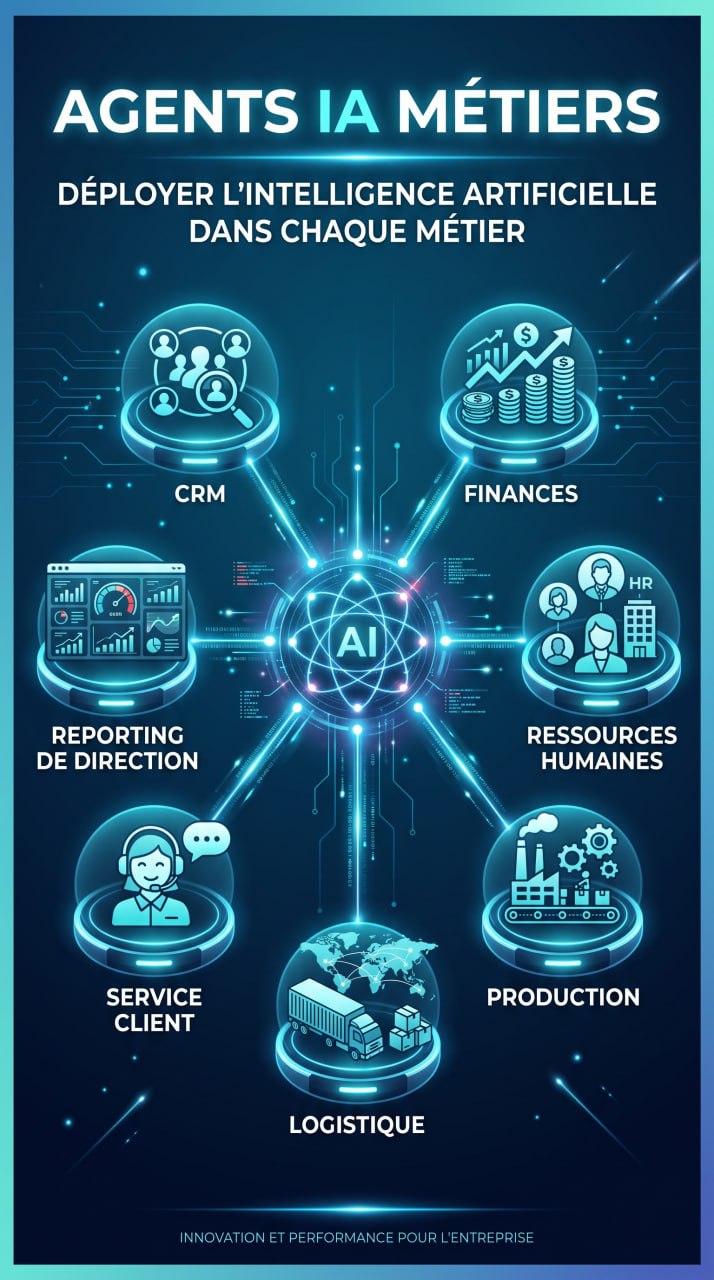
CRM and sales
Meeting preparation from the customer history, opportunity updates, follow-up on quotes left pending, account summaries.
Accounting and finance
Bank statement reconciliation, detection of missing supporting documents, preparation of statements, payment deadline tracking.
Human resources
Shortlisting applications against explicit criteria under supervision, interview preparation, leave and training tracking.
Production
Work order tracking, reporting of consumption variances, downtime entry, preparation of production reviews.
Logistics and procurement
Order and delivery tracking, comparison of supplier offers, stock-out alerts, import file preparation.
Customer service
Answers to recurring questions from approved documentation, ticket creation and follow-up, documented escalation to a responsible person.
Management reporting
Consolidation of key indicators, explanation of variances, a summary note built on identified and dated sources.
Three conditions without which an agent becomes a risk
A business context layer
An agent does not guess your rules. It needs the vocabulary of the company, indicator definitions, procedures, escalation thresholds and reference sources.
Explicit permissions
Every agent has an identity, a data perimeter, a list of tools and written limits on what it may do. It does neither more nor less than what is defined.
Logs and validation
Every tool call is traced: who, what, when, on which data, with which result. Sensitive actions still require a person's approval.
What we entrust to an agent, what stays with people
| Entrust to the agent | Keep with people |
|---|---|
| Searching for and gathering scattered information | Validating information before sensitive use |
| Preparing a document, a note, a report | Signing, committing the company, sending to a third party |
| Checking consistency and flagging variances | Arbitrating when two departments disagree on a figure |
| Executing reversible, listed actions | Granting an exception or handling a special case |
| Reporting what was done, and what failed | Answering for the decision before management |
The tools we put to work
We do not start from a vendor preference, but from your infrastructure, your confidentiality constraints and the skills you have available.
Hermes Agent Nous Research
A full agent environment — tools, memory, skills — that runs on your own infrastructure.
DeepSeek Harness DSH
An agent execution harness built on DeepSeek models, driven from the command line and extended through modules.
Claude Code
Anthropic's command-line development agent, which works directly inside a code repository.
OpenClaw
A self-hosted, local-first open-source agent under the MIT licence: processing and data stay on your own hardware.
Codex
OpenAI's development agent, usable from the command line as well as from a code editor.
OpenCode
An open-source development agent in the terminal, independent of the model vendor you choose.
Open models in house
Models with public weights running on your own hardware, for the tasks that must not leave your walls.
How we build an agent
Choose the process
A repetitive, measurable process, with enough volume, written rules and a named owner.
Describe the business rules
Vocabulary, thresholds, exceptions, edge cases, reference documents and a definition of what counts as correct.
Connect the tools
Business applications, databases, email, files: every access is named, limited and documented.
Put the guardrails in place
Permissions, logging, human validation, execution limits, a degraded mode when a dependency is down.
Test with the users
A narrow pilot, real cases, comparison with the manual job, correction of gaps before widening the scope.
Go live and monitor
Monitoring, log review, adjustment of the rules, user training, gradual extension.
Start with the task that costs you the most time
Describe the process, the tools it crosses and the people who carry it today. We will tell you what can be entrusted to an agent, and what cannot.